Many of us have shifted from creating Figma wireframes and designs to AI-generated prototypes and applications.
For one of my clients - a project that involved a lot of wireframing - I proposed that we switch to AI-based prototyping. He agreed, but then the question came up: how would he provide feedback? With Figma, it was easy - he could just leave comments on the frames. But with a live prototype, there’s no natural way to do that.
We experimented with Loom videos, but they had drawbacks. You sometimes miss things while recording, and it’s difficult to extract specific requirements from a video - even though I had built a tool to automate that. Then he proposed capturing screenshots of each screen, pasting them into Figma, and using Figma to review the prototype. I didn’t like this approach either. You can’t realistically capture screenshots of every state of the app, and using Figma just as a review layer felt inefficient.
I was looking for a solution when I came across Agentation - someone had posted about it on X. I checked out the website and it looked really promising.
What is Agentation?
Agentation is a React library that adds an annotation toolbar to any app. Install it, add <Agentation /> to your layout, and reviewers can click on any element to leave feedback. When a reviewer clicks on a button, Agentation captures:
- The CSS selector (e.g.,
.pricing-section > .card:nth-child(2) > button.cta) - The React component tree (e.g.,
App > PricingSection > PricingCard > Button) - Computed styles, selected text, and the reviewer’s comment
This is the key difference from a screenshot with a circle drawn on it. An AI coding agent can take that CSS selector, grep the codebase, and find the exact element to fix. No ambiguity about “which button.”
At first glance, it seemed like Agentation was primarily made for developer-to-agent feedback. But then I discovered their webhook support - annotations can be sent to any URL you register as structured JSON. That’s when it clicked: what if I hook this up to a Slack channel and have the client put comments directly on the prototype?
How everything is tied together
I built a small webhook server called ReviewHub to bridge Agentation and Slack. It captures annotation feedback from the client, posts it to a dedicated Slack thread with a screenshot of the current screen, and from there I tag @Devin to process the feedback after my approval. I use Devin here because it integrates well with Slack, but any AI coding agent that can read structured input and push code would work - Cursor, Claude Code, Copilot, or whatever you prefer.
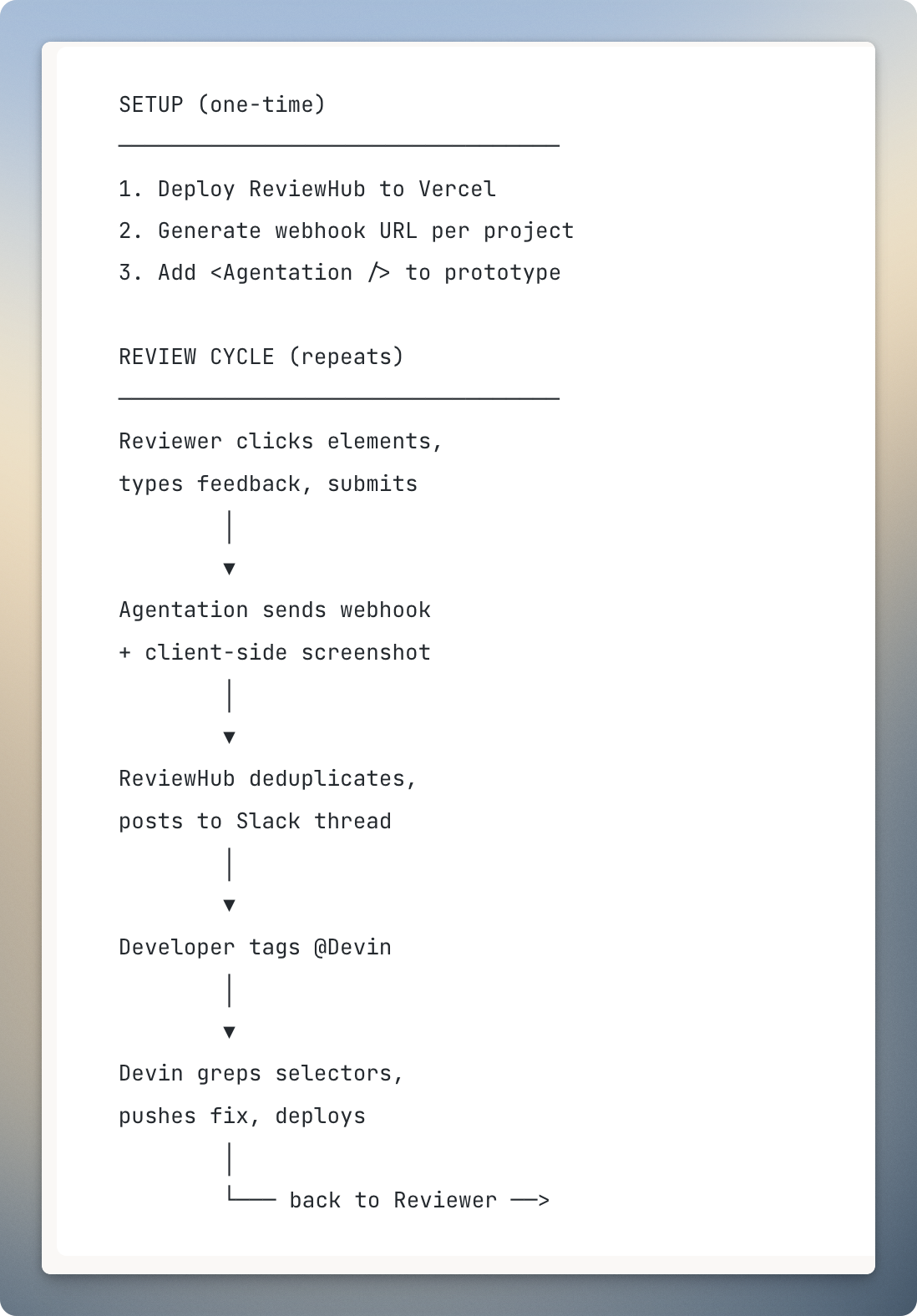
Why I built ReviewHub
Agentation supports copy/paste output, raw webhooks, and MCP integration, so if your workflow is just annotate and paste into an agent, you don’t need a server at all. But for a client-facing review process, I needed a few things Agentation doesn’t handle on its own:
- Screenshots. Agentation captures element-level data but not a full-page screenshot. ReviewHub captures one client-side (using
modern-screenshot) and uploads it to Slack alongside the annotations. - Per-project Slack threads. All feedback for a given project lives in a single thread - organized, searchable, easy to reference.
- Deduplication. Agentation fires events both in real-time and on manual submit. Without dedup, the same comment gets posted twice.
- Routing flexibility. The same server can be pointed at Slack, GitHub Issues, Jira, or all of them at once.
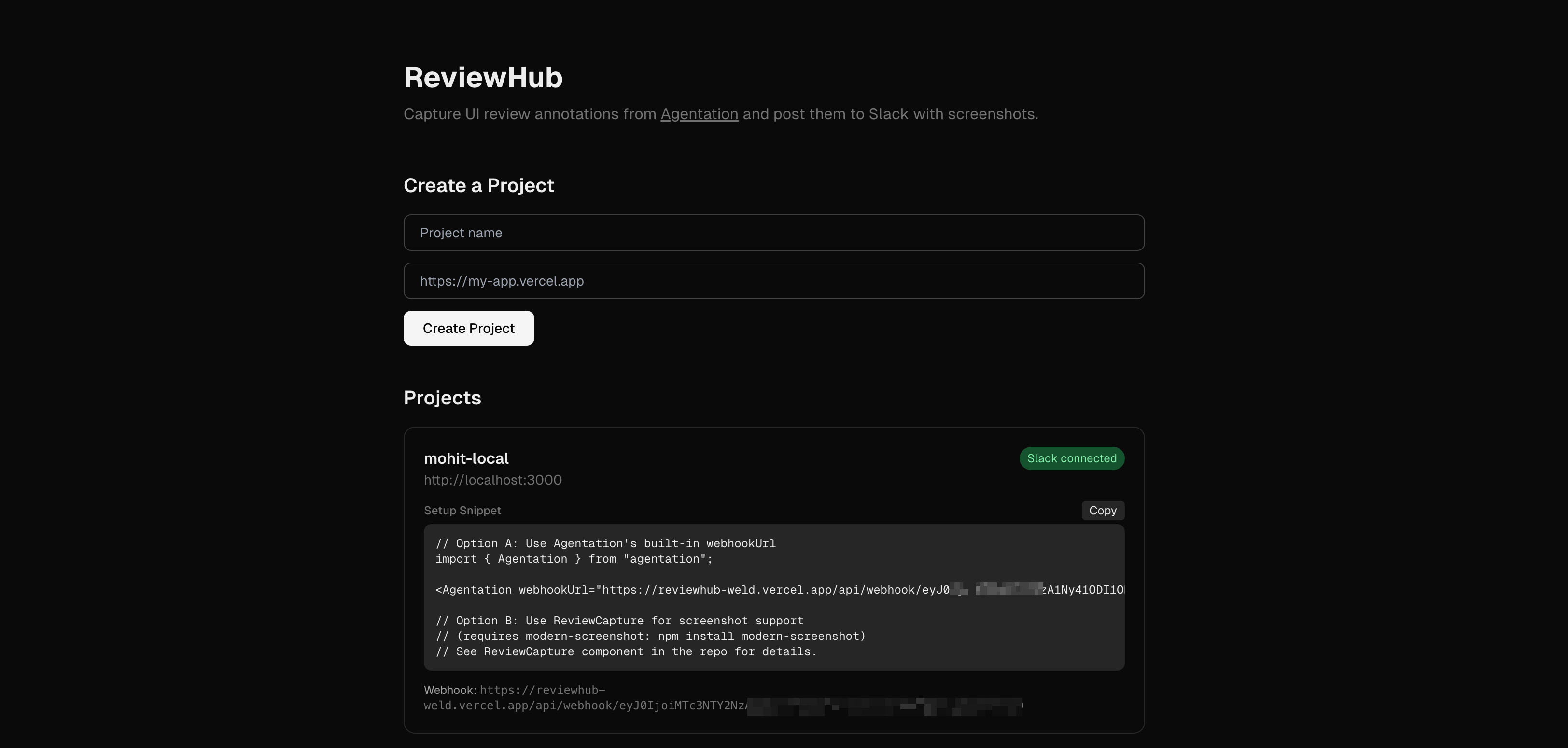
ReviewHub is a stateless Next.js API deployed on Vercel. No database, no user accounts, no dashboard. The webhook URL encodes all the project state (Slack thread ID, project name) as a base64 token, so it works cleanly with serverless functions that don’t share memory across invocations.
How to set up a similar workflow
The simple version (no server)
If you just want structured annotations on a live prototype, you only need Agentation:
npm install agentation// In your root layout
<Agentation />The reviewer opens the prototype, clicks elements, types feedback, and copies the structured output to paste wherever they need it. No server, no deployment, no configuration.
The automated version (with ReviewHub)
If you want annotations to reach Slack automatically without the reviewer copy-pasting anything:
Step 1: Deploy the ReviewHub webhook server.
It’s a standard Next.js app. You need a Slack app with chat:write and files:write bot token scopes (create one here), a Slack channel where the bot is invited, and a Vercel account. Set two environment variables:
SLACK_BOT_TOKEN=xoxb-your-bot-token
SLACK_CHANNEL_ID=your-channel-id
Deploy to Vercel. The landing page lets you enter a project name - it creates a Slack thread and gives you a permanent webhook URL.
Step 2: Add Agentation to your prototype.
npm install agentation modern-screenshot// In your root layout
<Agentation webhookUrl="https://your-reviewhub.vercel.app/api/webhook/{token}" />You also add a ReviewCapture wrapper component (included in the ReviewHub repo) that uses modern-screenshot to capture the full page when the reviewer submits.
Step 3: Share the prototype URL.
The reviewer doesn’t set up anything. They open the link, the toolbar appears, they click and comment. Annotations and a screenshot are posted to the Slack thread automatically.
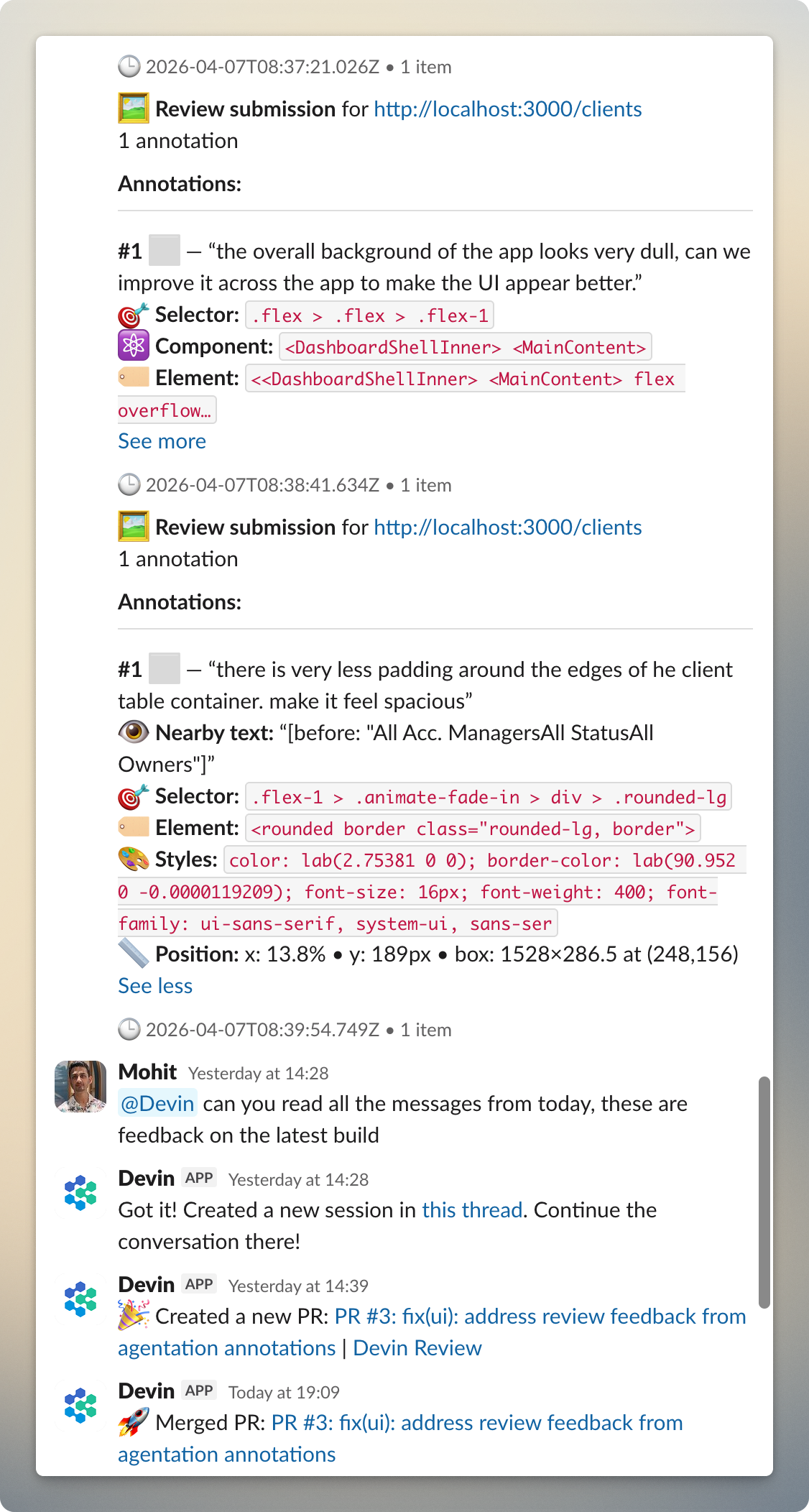
What shows up in Slack
Each submission posts the annotations with CSS selectors, component paths, and severity tags. Readable by a human, actionable by an AI agent that can grep for the selector. From there, tagging @Devin kicks off the fix.
Limitations
- Desktop only. Agentation requires a desktop browser.
- Screenshots don’t include annotation markers. The screenshot is a plain page snapshot. The CSS selectors and selected text compensate, but you can’t visually match “marker #3” to a spot on the image.
- Annotations are local to the reviewer’s browser. Stored in
localStoragewith a 7-day expiry. You can’t see what the reviewer marked on your own machine. Agentation offers “Agent Sync” via their MCP server to share state across machines, but I haven’t wired that in yet. - No way to mark annotations as resolved for the reviewer. The MCP server has resolve/dismiss tools, but without Agent Sync enabled, that status doesn’t propagate back. Reviewers need to clear annotations manually or start a fresh round.
- Markers are position-based. If you restructure the DOM between review rounds, old markers may point to wrong elements.
- Animations freeze during annotation. Helpful for targeting elements, but some third-party animation libraries may not fully pause.
What I’d improve next
The biggest gap is the one-way communication. With Agentation’s MCP server and Agent Sync, I could potentially have Devin resolve annotations after fixing them, and have that status reflected for the reviewer. This would close the feedback loop properly.
Resources:
- ReviewHub (webhook server): github.com/mnttnm/reviewhub
- Agentation (annotation library): agentation.com
- Devin (AI coding agent): devin.ai